Best tool to see the query fan-outs ChatGPT runs for a prompt: how our SEO team uses them
Query fan-outs are the keyword research of AI search. The tool our SEO and GEO team uses to see what ChatGPT searches for each prompt, and how we turn it into pages.
Keyword research used to start with a seed term and a volume tool. For AI search, our starting point has shifted to a question a buyer might ask ChatGPT, followed by a look at what ChatGPT itself searched to answer it. Those searches are the query fan-outs. For most of our clients they've become the bridge between the SEO work we've always done and the GEO work we do now.
The tool we use for this is Promptwatch, the same platform we run client programs on. Here's why, and how the work fits together.
Why fan-outs matter to an SEO team
OpenAI's help center explains that when ChatGPT searches the web, it rewrites your question into one or more targeted queries and passes them to search providers, then may follow up with more specific queries once it has seen results. Google says its AI Overviews and AI Mode can use the same "query fan-out" approach.
So ChatGPT never searches for the whole sentence your buyer typed. It searches for shorter phrases, and the pages that rank for those phrases are the pages it reads. That should feel familiar to anyone who has done SEO: it's ranking, one step removed. If a client wins the classic search results for one sub-query and is missing for the other two, they lose the AI answer.
The tool we use, and the screen we live in
Promptwatch captures fan-outs from the responses its monitors collect, for engines that expose their searches. The screen our strategists spend most time on is the Query Fanouts table, switched to the By Prompt tab. Each tracked prompt sits on a row with its average visibility, and expanding it shows the sub-queries the model actually ran. Where search volume and difficulty are available for the prompt's keywords, they sit on the same row.
Our routine is short. Sort by lowest visibility. Expand a prompt. For each sub-query, ask whether the client's site would show up if a person typed that query into a search engine. Every "no" is a page brief, a page update, or a gap in internal linking. That's classic SEO work, and now we know which queries to aim it at.
We also open individual response pages when a client asks "why did ChatGPT cite our competitor there?" The exact searches behind that answer are on the page, next to the sources it cited.
What changed in August 2026
Fan-out behavior moves, which is why we don't treat it like a one-off keyword study. Promptwatch's report on ChatGPT's site: operator shows that on August 8, 2026, the share of fan-outs scoped to a single domain with site: jumped from 0.37% to 16.8%. Average fan-outs per response rose from about 1.08 to about 1.83 the same day (window July 26 to August 10, 2026).
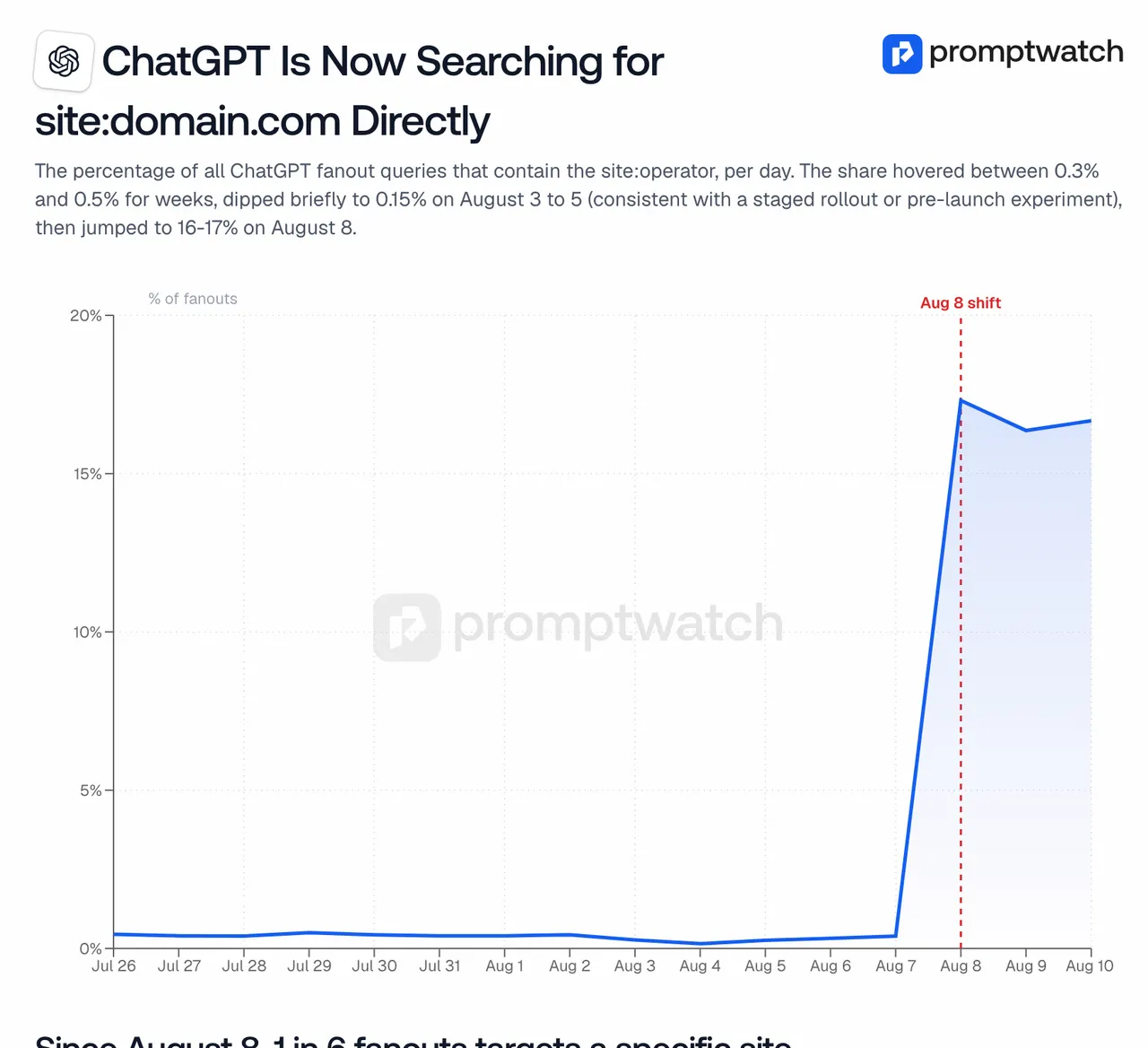
Promptwatch data report, "ChatGPT Is Now Searching for site:domain.com Directly", captured November 14, 2026.
For SEO, that site: shift is a technical brief. A site:yourdomain.com search can only surface pages that are indexed. Thin category pages, orphaned product pages, and an incomplete sitemap now cost clients AI answers as well as rankings. Promptwatch's site audit (weekly, with internal linking maps and pages missing from the sitemap) is where we check that.
How we turn fan-outs into published pages
On Promptwatch's Professional plan and above, Content Creation can start an article from a query fanout, with a brief that pulls in the client's branding, current search results, internal links, and up to five competitor URLs. Our editors review every draft; we don't publish untouched machine output for clients. On Business, the Content Agent can take a whole backlog of gaps and work it on a publishing calendar with a review inbox.
Then we measure. Promptwatch follows the published page through AI crawler visits, citations, and AI-referred traffic, so a client can see whether the page they paid for is being read and cited.
The free option we recommend for spot checks
For quick checks, and for training new team members, we use Promptwatch's free GEO Inspector Chrome extension. While you chat with ChatGPT, it lists every sub-query, the pages fetched, which ones were cited, and the reasoning trail. It runs locally without an account. It only sees your own session, so we treat it as a learning aid, not a measurement.
What we'd tell a client starting out
Pick the ten questions buyers ask before they contact sales. Install the extension and run them once to see the shape of the searches. Then track them properly, because one session shows one day. If you want to see the tracked version first, book a Promptwatch demo, or get in touch with us and we'll walk you through how we use it for clients.