What we exclude from client site audits, and what we never hide
How we decide which URLs to ignore in a client's site audit, which to fix or redirect instead, and the rules we follow so an exclusion never hides a real problem.
The first site audit on a new client is rarely short. It is usually long for the wrong reasons. Hundreds of warnings come from an old documentation version nobody maintains, a print template, filter URLs from a product listing, or a campaign microsite from four years ago that still sits in the sitemap. The issues that matter, a broken link on a pricing page or a redirect loop on a page that AI engines cite, end up somewhere on page nine.
Teams stop reading audits like that. It is a common state for an account we inherit: the weekly email arrives, the issue count runs into four figures, and nobody opens it anymore. So part of setting up an audit is deciding what it should not look at. This post is about that decision. Our weekly site health routine covers how we read an audit once it is clean; here we cover how it gets clean without hiding anything.
Excluding is not fixing
This is the rule everything else hangs on. Telling an audit to skip a URL changes what the audit reports. It changes nothing on the site. A page that returns a 500 still returns a 500 to Googlebot and to GPTBot after you ignore it. A page with a broken canonical still has a broken canonical.
So before anything gets excluded, we ask a plainer question: does this URL deserve to exist in its current state? There are three answers, and only one of them leads to an exclusion.
Fix it. The page matters to users, to search, or to AI answers, and the problem is real. It stays in the audit until the fix ships.
Redirect or remove it. The page has no reason to exist anymore, like a retired product page or a staging path that leaked into production. The right move is a redirect, a 410, or a noindex, depending on whether it has links and traffic. Once that is done, the audit will report on the redirect, which is useful in its own way.
Exclude it. The page is meant to exist, it is fine for what it is, and its warnings are noise for this audit. Old versioned docs that customers on legacy contracts still read. Paginated archive pages. A print view. These go on the exclusion list.
If we cannot say which of the three a URL is, it stays in the audit until we can.
What we never hide
Two groups of URLs are off limits for exclusion, whatever their warning count.
The first is anything that should be indexed. If a page is supposed to rank or be found, its problems are the audit's job. Hiding them because they are annoying is how a site ends up with a slow leak nobody can see.
The second is anything AI engines cite or crawl. A page can look like low-value clutter from the outside and still be the page ChatGPT keeps pointing to. Before we ignore a folder, we open a few of its URLs in Promptwatch's Sitemap view. A page there opens on an AI Visibility tab that charts how often AI cites that URL, with the prompts and responses that cite it. On clients with crawler logs connected, the page's Agent Analytics tab shows crawler visits and citation visits for that URL alone. If either shows activity, the folder is not noise, whatever it looks like.
The noise we usually find
Some patterns come up on almost every client. Here is how we tend to treat them, with the reason in each case.
Old documentation versions. A /docs/v1/ tree kept online for customers who have not upgraded. The pages are intentionally stale, so freshness and content warnings on them mean nothing. We exclude the folder, after checking that the old version is not the one AI engines cite when someone asks a how-to question. If it is, that is a content problem for the current docs, and we write it down separately.
Faceted and parameter URLs. Sort orders and filter combinations. If these are reaching the audit, the first question is how. They usually come in through internal links, which means crawlers find them too. That is an index bloat problem to fix with canonicals and link handling, as in our technical audit checklist. Once it is handled at the source, excluding the leftover pattern from the audit is fine.
Paginated archives. /blog/page/2/ and onward. They exist for navigation, and their thin-content warnings repeat every week. We exclude the pagination path, not the blog.
Print and alternate views. Print templates and old AMP copies. If they are canonicalized correctly, we exclude them. If they are not, that is a fix first.
Legacy campaign pages. Old event and promotion pages. These are the ones we argue about most. Many should be redirected. Some have backlinks or still get cited and need a short refresh. Only the ones that are deliberately kept as an archive get excluded.
Page, folder, or regex
Promptwatch's site audit (on every paid plan) added ignore rules on November 13, 2026, and they come in three shapes. You can ignore a single page, everything under a folder, or any URL that matches a regex. The Health view has an ignore menu right on issue rows and failing URLs, with the same three choices: this page, everything under its folder, or a custom rule.
The folder rule matches the path and everything under it. The dialog spells out the edge case: /blog matches /blog and /blog/post, but not /blog-archive. That is the behavior you want most of the time, and it is also the one to be careful with. A rule for /blog takes every post with it. A rule for /blog/page takes only the pagination. We always write the narrowest path that covers the noise.
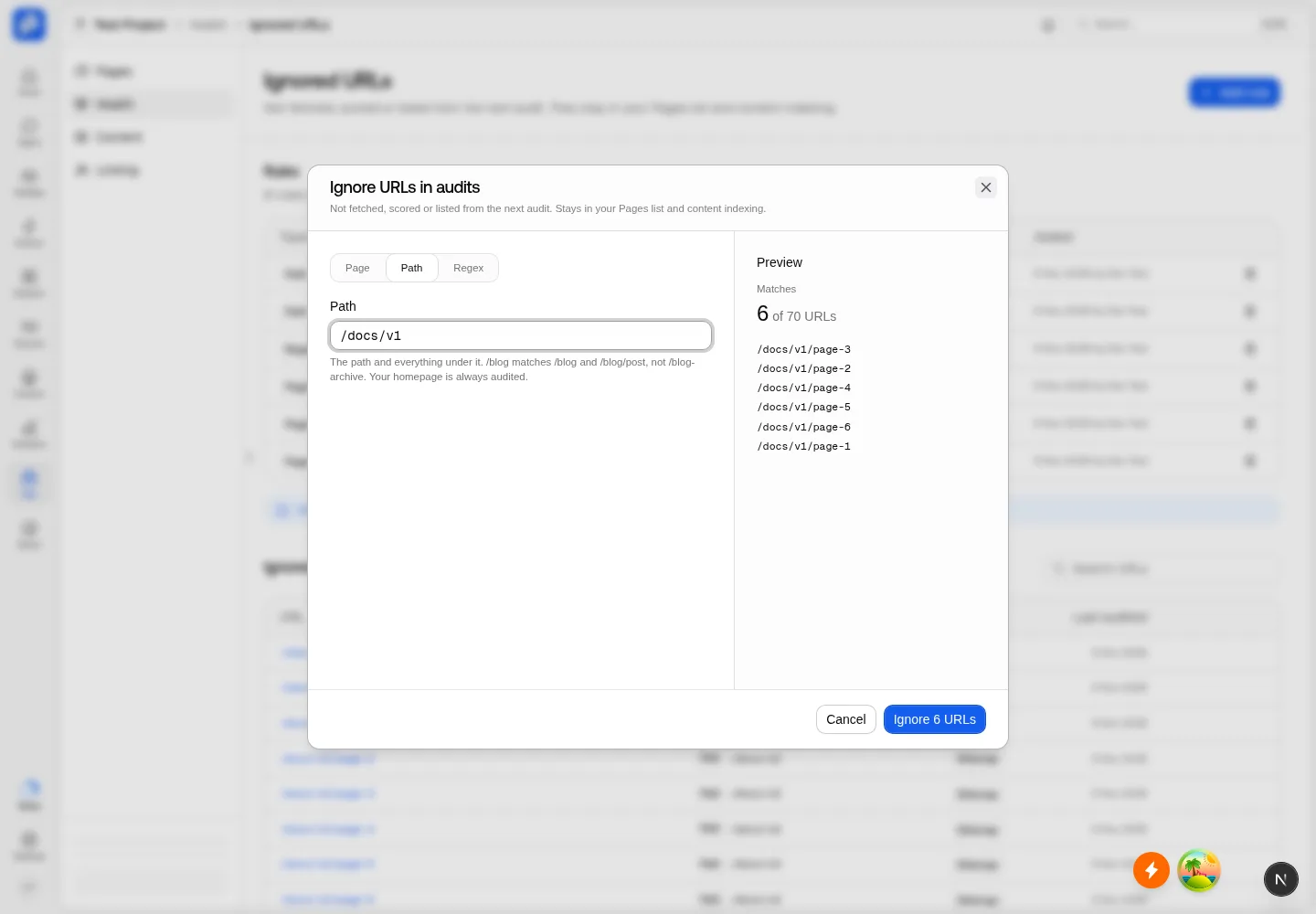 Promptwatch Ignore URLs in audits dialog, from the Promptwatch changelog (November 13, 2026). Example project data.
Regex is for patterns that do not live in one folder, like a tracking parameter that shows up across the whole site. The Regex tab has examples to start from. We treat regex rules with the most suspicion, because one loose character can match far more than intended.
Preview before you save
The rule dialog previews matching URLs as you type. We read that list every time, not just the count. Three things we look for:
- A URL in the preview that should be indexed. If one appears, the rule is too wide.
- A count that is far bigger than expected. A pattern meant for a few dozen print pages that matches thousands of URLs has caught something else.
- A count of zero. The pattern is wrong, or the noise you saw is coming from somewhere else.
The homepage is always audited, whatever the rule says, so a bad regex cannot hide that one page. It can still hide most of the rest. The preview is where you catch it.
What happens after you save
The behavior after saving is what made us comfortable using exclusions on client accounts.
Ignored URLs are not fetched, scored, or listed from the next audit on. They stay in the Pages list and are still read for content, so they don't vanish from the project. You can still look them up.
URLs you ignore after a run stay in that run's report, greyed out with a badge, and drop out at the next audit. The current report doesn't silently rewrite itself.
And the one we care about most: Action cards and the audit email do not count newly ignored pages as fixed. If an exclusion made the issue count drop and called it progress, someone could clear a report by hiding it, and the weekly email would cheer them on. It doesn't work that way. A drop that comes from an exclusion is not reported as a fix.
Every rule, and the URLs it covers, is listed under Project settings > Sitemap, next to the other settings that decide what gets crawled and audited. That is the page we review with the client.
How we run exclusions on client accounts
These are commitments, not results, and they are the same on every account.
We write a reason next to every rule in our audit notes. "Legacy docs kept for v1 customers, not cited, reviewed in March." A rule without a reason gets removed.
We never add a rule on the first audit. We read the full, noisy report once, so we know what the site looks like before anything is filtered.
We check citations and crawler activity before excluding any folder, as described above.
We review the rule list every quarter, and after any migration or redesign, because a folder that was noise last year can become a live section.
We tell the client when an exclusion goes in. Their team should know the audit is not looking at a path, especially if their developers keep shipping to it.
Plan limits, briefly
Site audits are on every paid Promptwatch plan, with a page allowance that grows by plan: 1,500 pages on Essential, 5,000 on Professional, 25,000 on Business, and 10,000, 25,000, and 75,000 on the Kick-off, Growth, and Scale agency plans. Crawler logs, which feed the per-URL Agent Analytics check, start on Professional and are on every agency plan. On a client without them, we lean on the AI Visibility tab and citation data before excluding anything.
Where to start
Open the last audit for your site and sort issues by URL path. Find the one path that produces the most warnings, then decide whether it needs fixing, redirecting, or ignoring before you touch the rule dialog. If it really is noise, check its citations, write the narrowest rule that covers it, and read the preview. If you want to try this on your own site, Promptwatch has a 7-day free trial on monthly billing on every self-serve plan, and site audits come with all of them.