AEO tools for content teams: how we brief and refresh
How we use AEO tools with content teams: picking gaps, building briefs from citation data, the Knowledge Base, internal links, review inboxes, and refresh cadence.
Content teams don't need another dashboard. They need to know what to write next, what to say in it, and which old page to fix before it stops being cited. An AEO tool earns its place with a content team when it answers those three questions with evidence, and when it fits into the way writers and editors already work.
This post is about that workflow as we run it with client content teams: how a gap becomes a brief, how the brief becomes a draft, and how we decide what to refresh. The tool we use is Promptwatch, the platform we run client programs on. If you're still comparing tools, our top AEO tools guide covers the selection side.
Choosing what to write: gaps, not hunches
Every brief starts from a measured gap. Promptwatch's content gap analysis, on every brand plan, compares the client's pages with the questions engines answer in their category and gives each topic a coverage score. A low score on a topic with real demand is a candidate.
We filter candidates with two more questions before anything reaches a writer. First, which pages do engines cite for this prompt today? If the cited pages are comparisons and the client has none, that tells us the format. Second, what did the engine search for? Query fan-outs show the sub-queries an engine ran before answering. If ChatGPT searched for "pricing" and "integrations" alongside the main question, the article has to answer both.
The output is a short list, ordered by demand and by how close the client already is. We would rather ship four pieces that close real gaps than twelve that fill a calendar.
Building the brief
In Promptwatch, a piece can start from any topic you describe, or from something already in the data: a tracked prompt, one of its fan-out queries, or a page engines cite. Writing in the platform uses AEO articles. Professional ($245 a month) includes five, with add-ons up to 50, and Business ($579) includes ten, with add-ons up to 125.
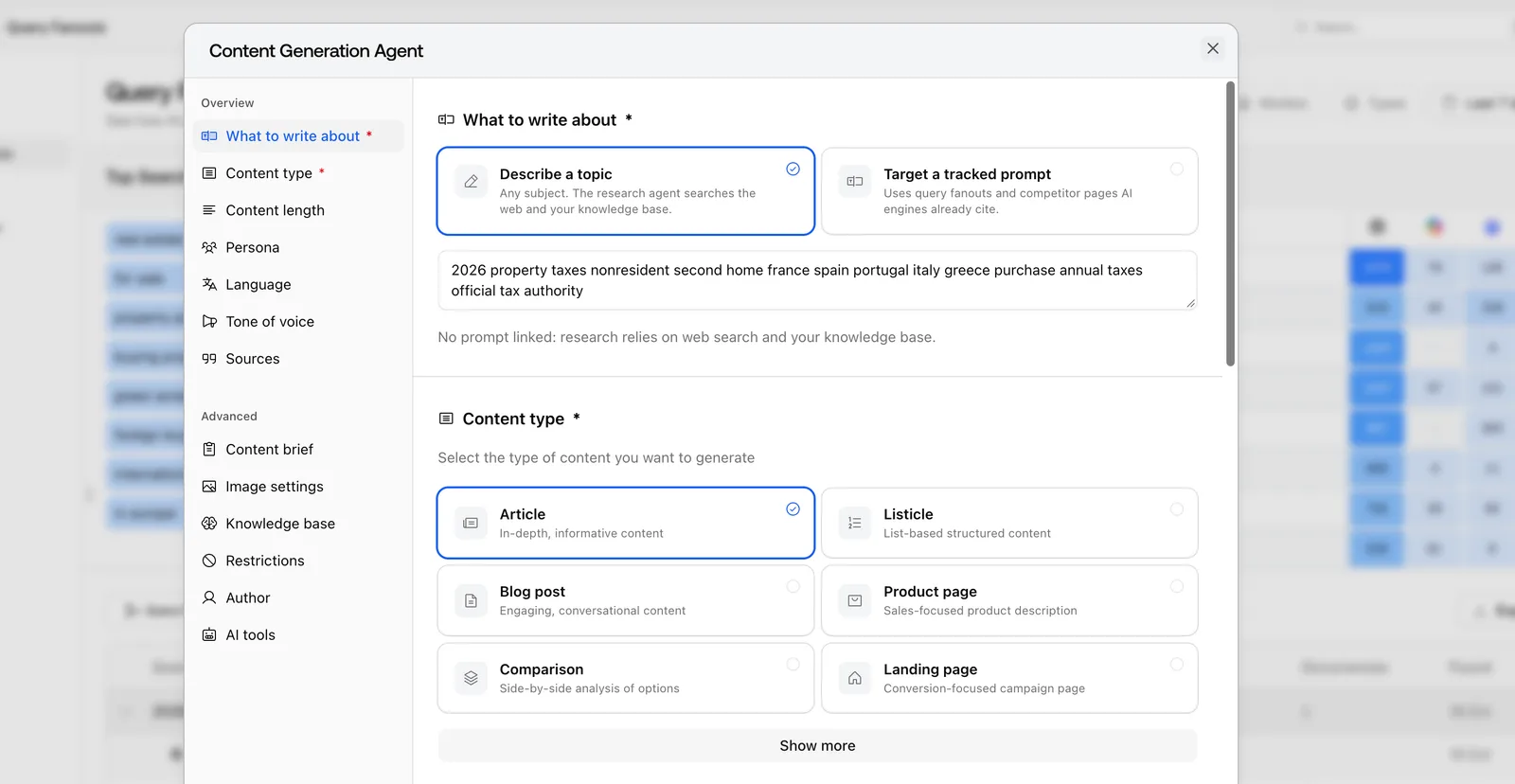 The Content Generation Agent dialog as shown in Promptwatch's changelog, filled in for an example project.
Into the brief go the client's branding and tone, current Google results and news, candidate internal links, transcripts of relevant YouTube videos, screenshots of live pages, and as many as five competitor URLs you choose. When we target a tracked prompt, research uses the query fan-outs and the competitor pages engines already cite, so the brief starts from what the engine reads, not from a keyword tool's guess.
Our rule for competitor URLs: pick the pages that are cited, not the competitors the client worries about. A cited page shows what the engine considers a good answer. An uncited page from the client's main rival only shows what the rival thinks.
Feeding it facts: the Knowledge Base
A draft is only as accurate as what the writer knows. The Knowledge Base, from Professional (100 items) and Business (150 items), holds the client's own material: product sheets, pricing notes, policy pages, interview transcripts. The Content Agent searches it by meaning, so a draft about "returns for business customers" finds the right policy document even if it uses different words.
We load it before the first brief, and we treat it as a deliverable. Proprietary facts are the one thing a competitor's page can't copy, and they're what makes an article worth citing. Promptwatch's TreeHouse case study, for the rental platforms Pararius and Huurwoningen.nl, credits publishing their own rental data as one of the steps that grew AI search into about a quarter of organic conversions. That's their result, after several changes. We cite it for the method, not as a forecast.
Internal links from Search Console
Before writing, Promptwatch's content creation picks internal links. Its preference is for pages that Search Console shows getting lots of impressions and not many clicks. Google already shows those pages and few people click them, so a link from a new, well-cited article can help them. For a content team, this replaces the manual step of searching the site for link targets after the draft is done. Since October 2, 2026, the Content Agent adds internal links from the first draft.
Drafting, editing, and the review inbox
Since the November 13, 2026 changelog, a new Content Agent article starts with its key takeaways, gives the answer to each heading right under it, and closes on a FAQ. That structure suits engines that quote short passages, and it suits busy readers. The editor has an AI chat panel with revertible edits, so an editor can ask for a tighter intro and undo it if it's worse. Every piece carries a "How this content was created" note.
For teams publishing on a schedule, there's the automated Content Agent, on Business and Enterprise only. You give it a monthly budget, publish windows and a calendar, and it plans, writes and publishes pieces aimed at the visibility gaps it finds. It can run fully automated, but with client teams we always use the review inbox: every piece waits for approve, edit, or decline.
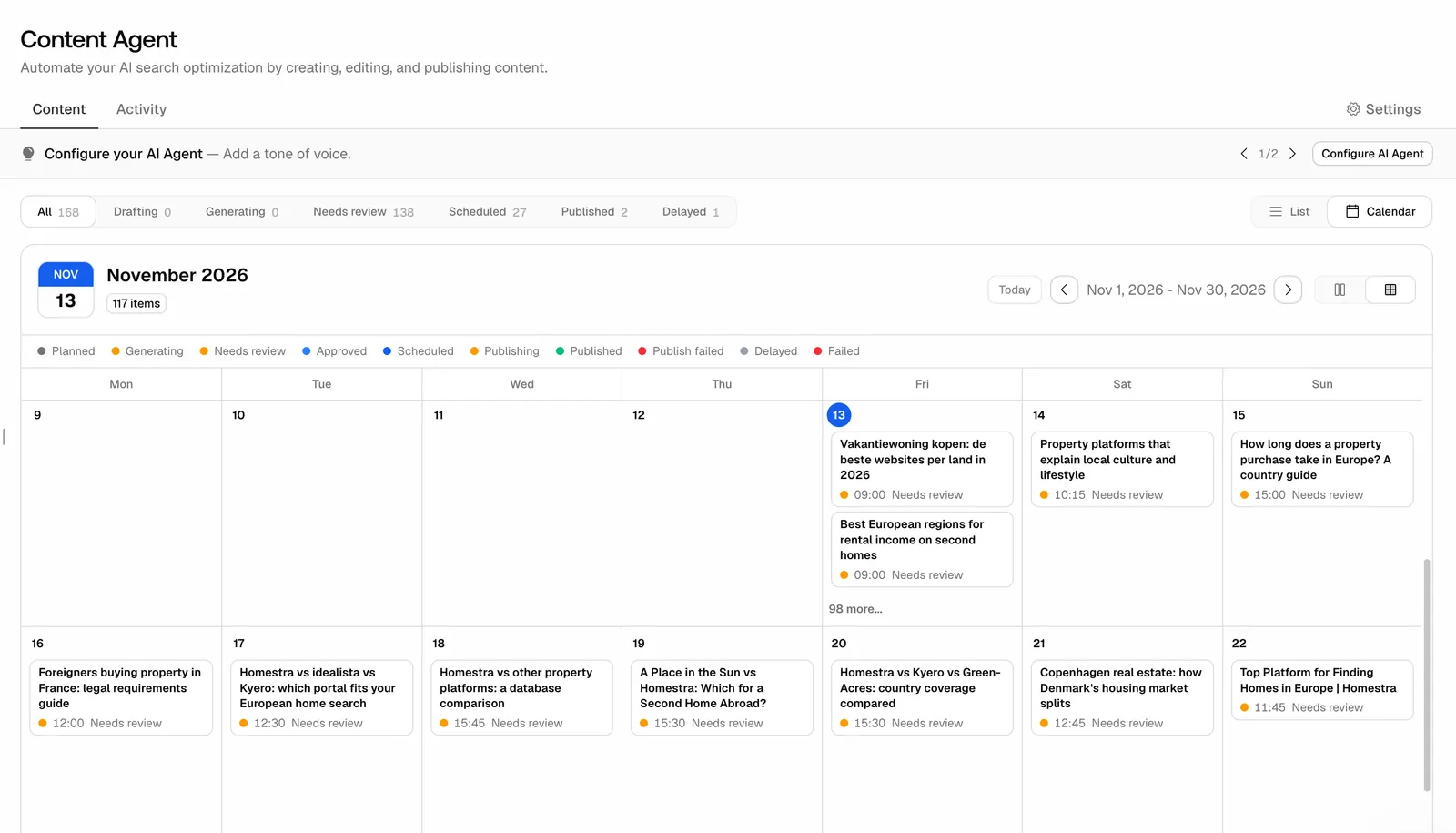 The Content Agent calendar in month view, from Promptwatch's November 13, 2026 changelog entry, with an example project.
The same update made pieces draggable, to another day in month view or another time in week view. A piece you placed yourself also stays put now, since the agent's background jobs leave it alone. That matters when an article has to go out with a product launch. Publishing goes to WordPress through the official plugin, to Webflow, or to Framer, as a draft or live.
Refresh: what to revisit, and when
Refresh work is where content teams lose the most time, because most teams refresh by date instead of by evidence. We use two signals.
The first is citation decay per page. Citation Trends gives every page a short history: the date engines first cited it, the days it needed to ramp up, the highest citation rate it reached, and how fast that rate halves afterward. A page whose citations are falling goes on the refresh list.
The second is the page type. For its content half-life report, Promptwatch took the pages ChatGPT cited on a single day, July 6, 2026, and watched them for 90 days. By day 36, half of the news pages had dropped out of ChatGPT's citations. At day 30, ChatGPT was still citing 78% of the landing pages and 76% of the docs.
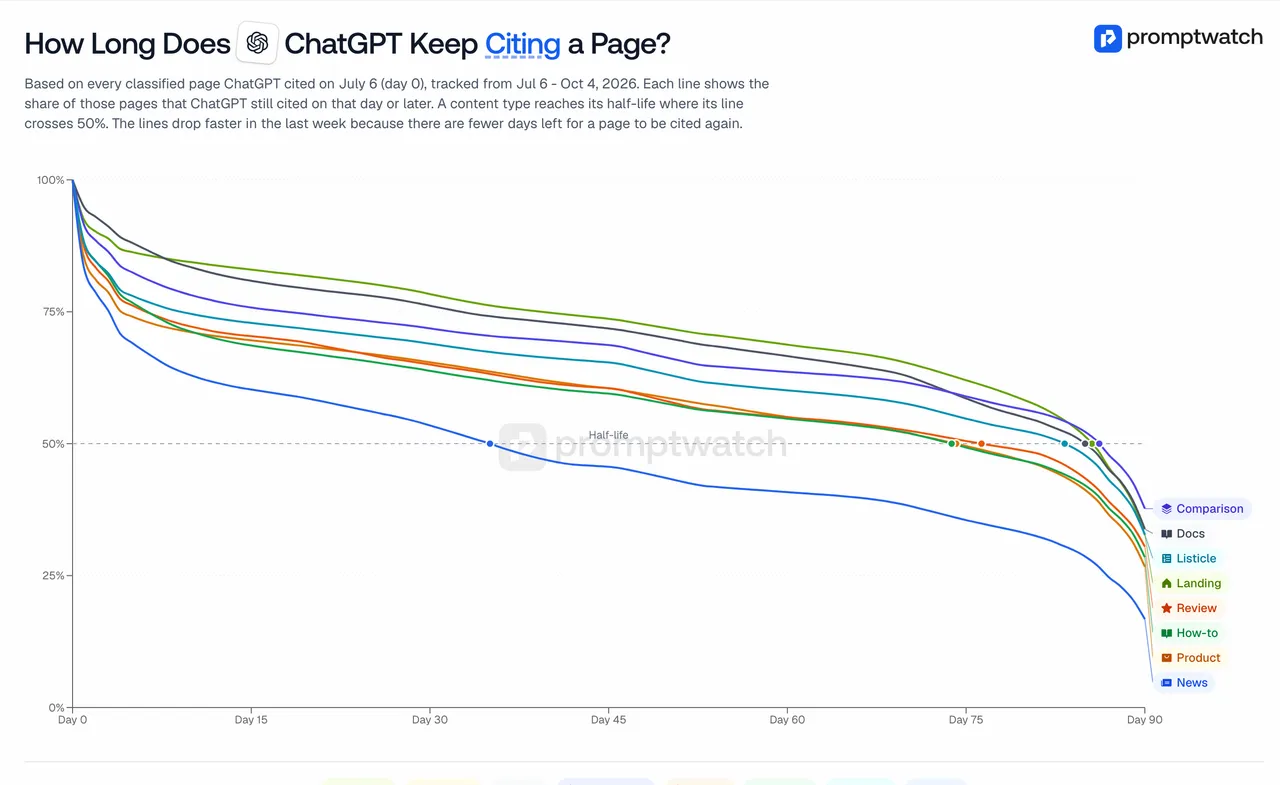 From Promptwatch's ChatGPT content half-life report: one line per content type for pages first seen July 6, 2026, followed to October 4. Captured on November 14, 2026.
So we don't put news and landing pages on the same refresh cycle. News is for short bursts. Landing pages and docs are long-term citation assets, and the job there is keeping facts accurate rather than rewriting.
Content Refresh produces diff-style update suggestions for an existing page, so an editor sees exactly which sentences change and why. We prefer it to a full rewrite on any page that is already cited, because a rewrite can throw away the passage the engine was quoting.
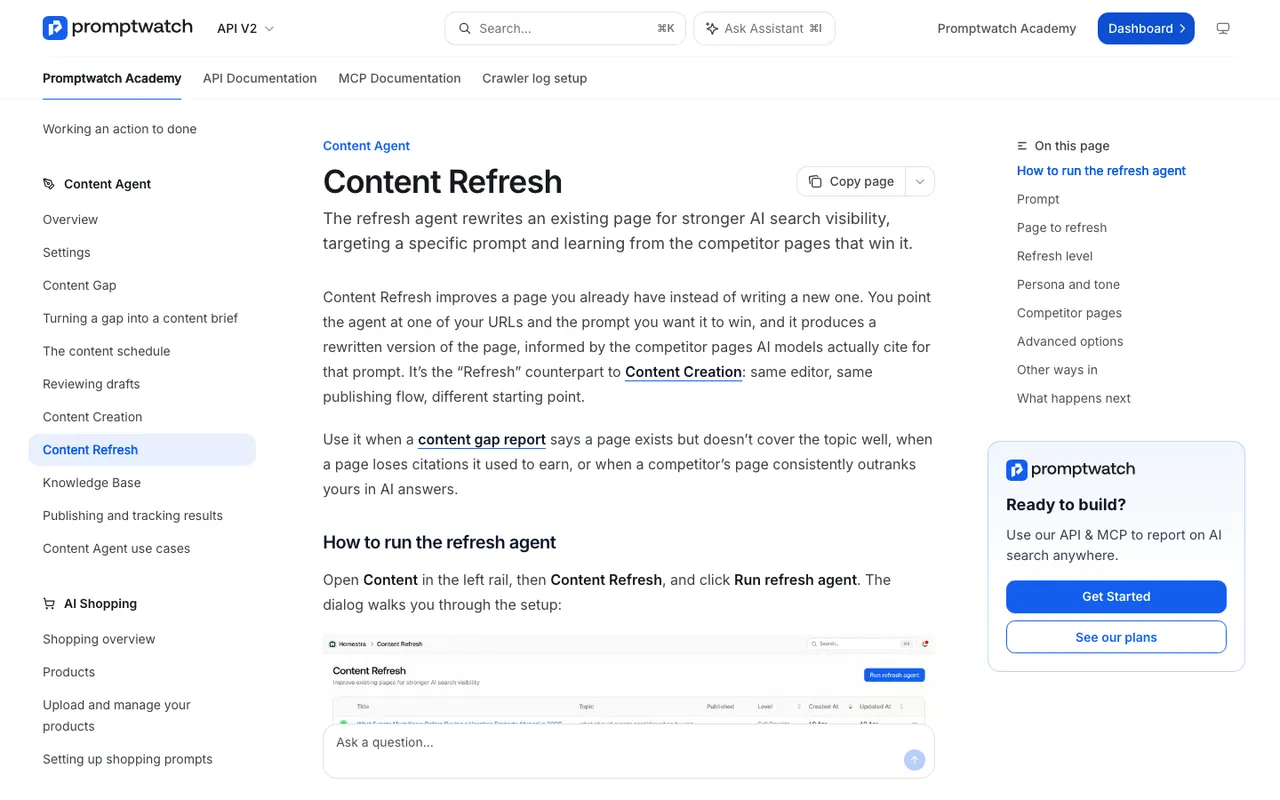 Captured November 14, 2026: the Content Refresh guide in Promptwatch Academy.
Other content tools, briefly
Content optimization tools have added AI tracking, and they're good at the editor side. In our catalog, Surfer's Standard plan is $99 a month billed yearly with 25 AI prompts refreshed weekly. Clearscope's Essentials is $129 a month for 50 tracked queries on ChatGPT and Gemini. Frase starts at $39 a month billed yearly, with 20 AI Visibility prompts and publishing to WordPress, Webflow, Sanity or Wix. AirOps is a workflow builder for content operations with task-based billing.
They help a writer score a draft. What our catalog entries don't document is the loop around the draft: crawler logs showing whether the published page was fetched, citation tracking for that page, and AI-referred visits. In Promptwatch, a document's publish status follows it past the live URL into crawler visits, citations and AI-referred traffic. A page that doesn't perform returns to the team as a refresh suggestion or an Action Board card. For a content team, that feedback is the difference between publishing and learning.
What we commit to with content teams
Every brief names the gap it closes and the prompt it targets. Every draft goes through a human editor. Refresh decisions cite the page's own citation trend. And we report what happened to each published piece after 30 and 60 days, cited or not.
If your team wants to try this on its own backlog, Promptwatch's 7-day free trial on monthly billing covers Professional and Business, the two plans with AEO articles.